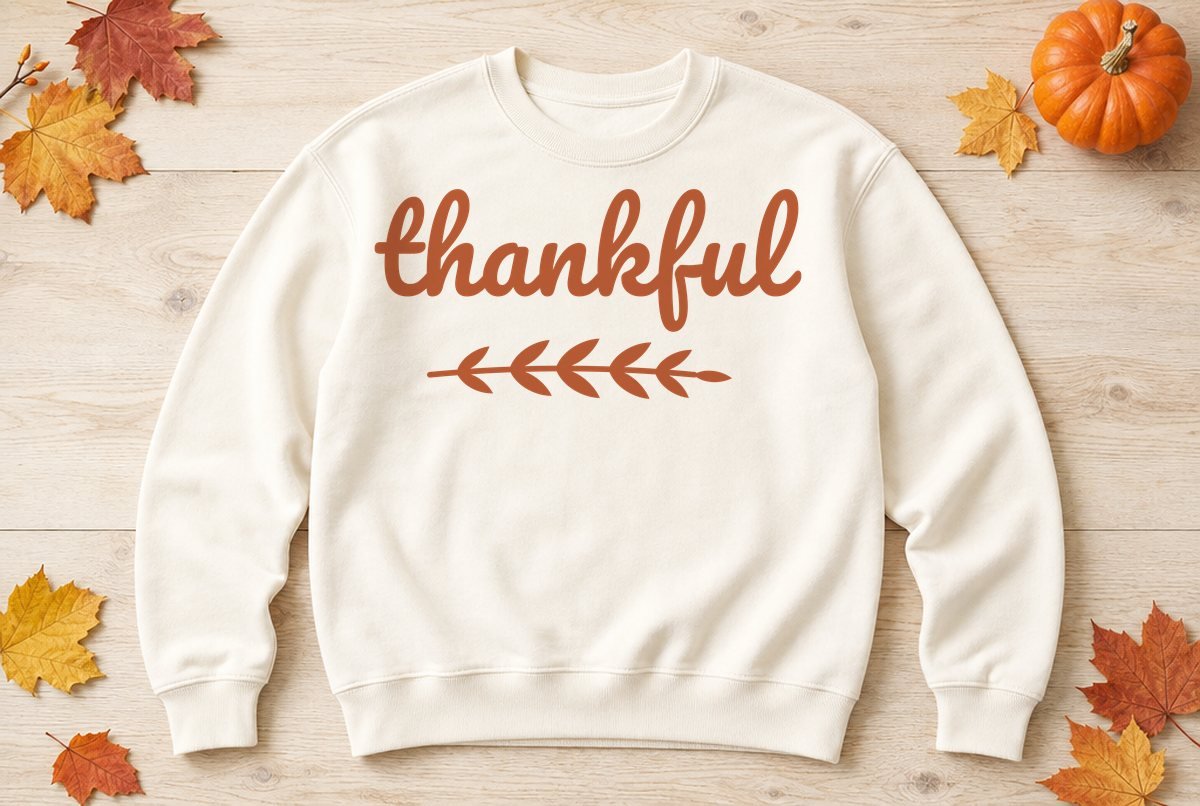
One word, done well. This file spells thankful in a thick, rounded brush script with a long looping “f”, and sets a small leafy sprig underneath like an underline. It’s the kind of design that works on a November shirt, a coffee mug and a wood sign without changing anything but the size.
So that’s what the download gives you: the same design sized three ways. The shirt file is 10.1 in wide for iron-on, the mug file is 3.6 in wide for adhesive vinyl, and the sign file is 11.1 in wide, also for adhesive vinyl.

| File | Size | Material | Layers | Check |
|---|---|---|---|---|
| Thankful, adult shirt | 10.12 × 5.12 in | HTV (iron-on) | 1 layer | ✓ Cut-checked |
| Thankful, mug | 3.62 × 1.75 in | Vinyl | 1 layer | ✓ Cut-checked |
| Thankful, sign | 11.12 × 5.62 in | Vinyl | 1 layer | ✓ Cut-checked |
How it’s built
Script lettering is where most free files cause trouble. The letters in a connected script overlap at every join, and if they’re left as separate shapes, your machine cuts a line through each overlap and the word falls apart when you weed it. Here all eight letters are welded into a single outline, so thankful lifts off the backing as one piece.
The sprig is its own piece: a thin curved stem with five pairs of leaves and a small bud at the tip. It sits below the word with a clear gap under the “f” descender, so the two never touch and there’s no sliver of vinyl trapped between them.
Each size was checked on its own, which matters for a design like this. The narrow loops in the tall letters and the counter in the “a” are small holes you have to weed out, and the stem of the sprig is the thinnest part of the file. At the mug size those features are at their tightest, so the mug file had to pass our adhesive vinyl minimums (no stroke under 0.035 in, no gap too narrow to clear) at exactly 3.6 in. The shirt file passed the wider iron-on minimums at 10.1 in.
What you need
- Cutting machine and a standard grip mat
- Iron-on (HTV) for a shirt, or permanent adhesive vinyl for a mug or sign
- Transfer tape (vinyl projects only)
- Weeding hook
- Heat press, EasyPress or iron and a pressing sheet (shirt only)
- A pre-washed shirt, a clean mug, or a painted or stained board
Making it
- Pick the file for your project. Upload it in Design Space through Upload > Upload Image > Browse. If you’ve never uploaded an SVG before, our upload walkthrough covers it. Silhouette Studio opens SVGs in Designer Edition and up; the DXF is in the ZIP too.
- Check the width. Shirt 10.1 in, mug 3.6 in, sign 11.1 in. Lock the proportions if you resize so the script doesn’t stretch.
- Set up the cut. For iron-on, Design Space mirrors the design automatically once you choose an iron-on material; confirm the Mirror toggle on the Prepare screen and load the HTV shiny side down. Adhesive vinyl isn’t mirrored.
- Weed. Pull the background away slowly, keeping the peel low and flat. Then pick out the letter loops with the tip of your hook. Leave the sprig for last and weed around its leaves one at a time.
- Apply. For the shirt, press with your material’s settings from the Cricut Heat Guide or the HTV maker’s instructions. For a mug or sign, lift the design with transfer tape, position it, burnish and peel the tape back at a sharp angle.
On the mug, apply the word and the sprig together on one piece of transfer tape so the spacing stays exactly as designed. Start at the center of the design and smooth outward toward both ends, since a mug curves away from you on each side. Our vinyl-on-a-mug guide has more on avoiding bubbles.
Sizes for different items
| Item | File to start from | Width |
|---|---|---|
| Coffee mug | Mug | 3.6 in (about 1.75 in tall) |
| Wine glass or stemless tumbler | Mug | 3.6 to 4 in |
| Adult shirt or sweatshirt | Shirt | 10.1 to 11 in |
| Tote bag | Shirt | 10.1 to 12 in |
| Wood sign, 12 in wide | Sign | 11.1 in |
| Porch board or large sign | Sign | 11.1 in and up |
The mug file is the smallest checked size. Going below 3.6 in wide can close up the loops in the letters and thin the sprig’s stem past what vinyl cuts cleanly. Also, if you cut the shirt design in iron-on, don’t shrink it to mug size: iron-on is thicker, and the design was only checked for HTV at 10.1 in.
Two ways to change it up
Two colors. Cut the file twice, keep the word from one color and the sprig from the other. Rust lettering with an olive sprig looks right for the season. On a shirt, press the larger piece first and the sprig second; our HTV layering guide covers pressing a second color without scorching the first. Since the two pieces don’t overlap, you don’t need to trim anything.
Stencil paint on wood. Cut the sign file from stencil vinyl or removable vinyl, weed the word away instead of the background, and paint through the opening. The letter loops are separate pieces in a stencil, so keep those little pieces from the weeding and stick each one back in place before you paint. For a matching table, it pairs with our Gather SVG and the Give Thanks sign. For a potluck with friends, the Friendsgiving SVG fits a tea towel or apron.
Troubleshooting
The leaves on the sprig are the parts most likely to lift with the background when you weed. If one comes up, press it back down on the liner with your fingertip right away, before the adhesive picks up dust. On a textured board, burnish the sprig hard; its thin stem has less adhesive area than the heavy script above it.
Questions
What size should a Thankful design be on a mug?
Our mug file is 3.6 in wide and about 1.75 in tall, which fits the side of a standard mug. Don’t go smaller than that.
Is the script welded?
Yes. The letters are merged into one outline, so the word cuts and weeds as a single piece. The sprig is a separate piece underneath.
Can I use this on a shirt?
Use the shirt file, 10.1 in wide and checked for iron-on. Mirror it before cutting and press with your material maker’s settings.
Can I sell items made with this file?
Yes, up to 500 handmade items per design, but not the digital file itself. The details are on our license page.