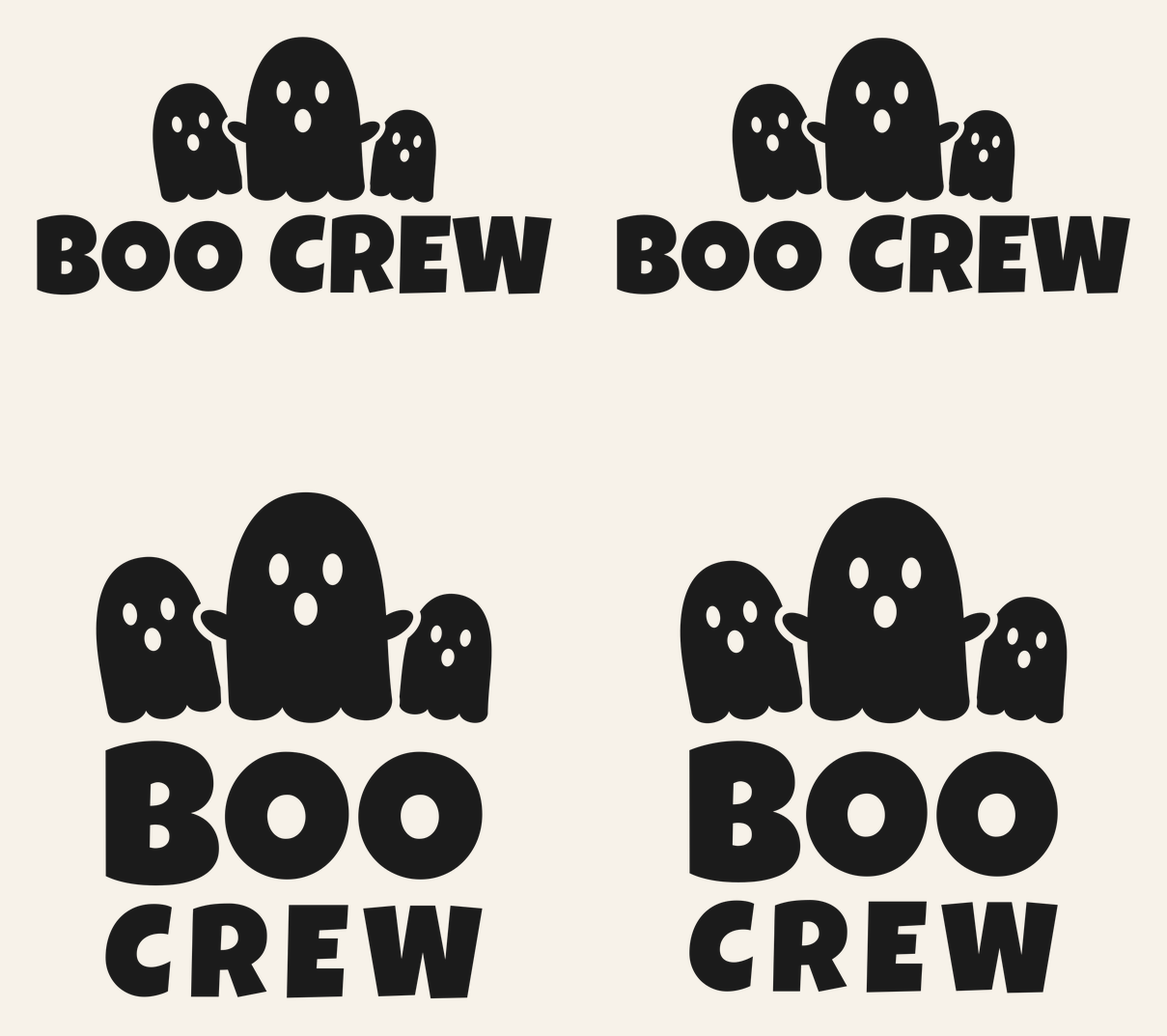
Matching shirts are the easiest family costume there is. Nobody has to agree on a theme, the baby doesn’t have to keep a hat on, and everyone’s done getting ready in two minutes. This Boo Crew SVG gives you three ghosts over chunky block lettering, sized so the whole family can wear the same design.
There are four files. The adult shirt is 10.12 x 5.12 in and the youth shirt is 8.12 x 4.12 in, both built for iron-on (HTV). A stacked version, with BOO and CREW on two lines under the ghosts, comes in at 5.62 x 7.25 in for toddler shirts, and the same stacked layout is 3.38 x 4.38 in in adhesive vinyl for a mug or tumbler.
| File | Size | Material | Layers | Check |
|---|---|---|---|---|
| Boo Crew, adult shirt | 10.12 × 5.12 in | HTV (iron-on) | 1 layer | ✓ Cut-checked |
| Boo Crew, youth shirt | 8.12 × 4.12 in | HTV (iron-on) | 1 layer | ✓ Cut-checked |
| Boo Crew, toddler shirt (stacked) | 5.62 × 7.25 in | HTV (iron-on) | 1 layer | ✓ Cut-checked |
| Boo Crew, mug | 3.38 × 4.38 in | Vinyl | 1 layer | ✓ Cut-checked |
How the ghosts and letters are built
The big ghost in the middle holds its arms out, and each arm crosses in front of a smaller ghost. Rather than welding all three into one blob, we knocked the side ghosts back so a thin gap runs around the middle ghost’s arms. You see three separate ghosts on the shirt, not one lumpy shape. Each ghost has two oval eyes and a round “o” mouth cut out as holes.
The lettering is Luckiest Guy, a heavy rounded display font that holds up well in iron-on. It’s converted to outlines, so you don’t need it installed. Every file is a single color and a single layer with 24 closed outlines: the ghosts, their nine face holes, the letters and the holes inside the B, both O’s and the R.
Each size got its own check against our iron-on minimums, which are wider than the ones for adhesive vinyl. The narrowest parts are the gaps around the big ghost’s arms and the little counters in the B. All four files passed at their listed sizes with no strokes too thin, no pieces too small and no slivers too narrow to weed.
What you need
- Iron-on (HTV) in one color, enough for every shirt in the family
- Shirts, sweatshirts or bodysuits in cotton or a cotton blend
- Standard grip mat
- Weeding hook
- Heat press or household iron, plus a pressing cloth
- Permanent adhesive vinyl and transfer tape, for the mug version
Making a set of shirts
Cutting several shirts at once goes faster than it sounds, since every file uses the same color. If you’ve never pressed a shirt, read how to make your first shirt with a Cricut first.
- Upload each size you need. In Design Space, click Upload in the design panel on the left, then Upload Image and Browse. Pick the SVG and save it. Our upload guide covers the app as well.
- Add one copy per shirt. Put the adult file on the Canvas once for each adult shirt, the youth file once per kid and so on. Check each width with the size lock closed: 10.12, 8.12 or 5.62 in.
- Check Mirror. Click Make. Design Space turns Mirror on automatically when you choose an iron-on material, but look at the mat preview anyway. BOO CREW should read backward.
- Cut shiny side down. Load the iron-on with the shiny liner against the mat, choose your exact iron-on type and cut. Design Space packs the copies close together to save material.
- Weed. Peel away the background, then pick out the ghost eyes, the mouths and the letter holes. The youth file has the smallest ghosts of the three shirt sizes, so give its faces a slower pass. Our weeding guide has tricks for small pieces.
- Press. Use Cricut’s Heat Guide for your iron-on and your fabric, and follow its time, temperature and peel directions. For other brands, use that maker’s settings.
Label each weeded design with a sticky note (Dad, oldest, youngest) before you stack them. Adult and youth versions look almost the same on the liner, and it’s annoying to find out at the press that you’ve grabbed the wrong one.
Who gets which file
| Wearer | File | Width |
|---|---|---|
| Adult S to XL | Adult | 10.12 to 11 in |
| Adult 2XL and up, sweatshirts | Adult | 11 to 12 in |
| Youth XS to L | Youth | 8.12 to 9 in |
| Toddler 2T to 5T | Toddler (stacked) | 5.62 in |
| Tall mug or tumbler | Mug (vinyl) | 3.38 in wide, 4.38 in tall |
The toddler file is taller than it is wide, so it fits a small chest without shrinking the letters. Don’t resize any of these below the listed width. The gaps around the ghost arms are the first thing to close up if you do, and then the three ghosts cut as one piece with torn edges.
For baby bodysuits, the toddler file is usually too wide. The Little Pumpkin SVG is built for that size and still looks like part of a family set.
The mug version
The mug file is the stacked layout at 3.38 in wide and 4.38 in tall, checked for adhesive vinyl. That’s taller than the flat area on many 11 oz mugs, which usually fits a design around 3 to 3.5 in tall, so measure the straight side of your mug first. It suits taller mugs, pint glasses and tumblers better. Cut it in permanent vinyl and don’t mirror it. Putting vinyl on a mug walks through getting it onto a curve without bubbles.
Color ideas
Black on orange shirts is the classic. White iron-on on black or charcoal shirts makes the ghosts look like ghosts, with the shirt showing through as dark eyes. Glow-in-the-dark iron-on is fun for kids who’ll be out after sunset. Check its own maker’s pressing instructions, as specialty iron-ons can differ from the standard kind.
Want each person to stand out a little? Cut the adult shirts in black and the kids’ in orange or purple, still using the same design.
If the big ghost’s arms peel up with the liner after pressing, the iron-on hasn’t bonded at those thin edges yet. Lay the liner back down, cover it and press again before you peel.
Questions
What size Boo Crew SVG for a toddler shirt?
Use the stacked toddler file at 5.62 in wide and 7.25 in tall. It was checked for iron-on at that size, so it’s safe to cut as is.
Can I use the adult file on a kid’s shirt?
Not at the adult size. Use the youth file at 8.12 in, which got its own iron-on check. Shrinking the adult file isn’t the same thing, since it wasn’t checked below 10.12 in.
Do I need to mirror Boo Crew for iron-on?
Yes. Design Space turns Mirror on automatically when you pick an iron-on material, but check that the words read backward on the mat preview before cutting. Don’t mirror the mug file.
Can I sell Boo Crew family shirts?
Yes, up to 500 finished handmade items per design, but not the SVG itself. The license page has the details.