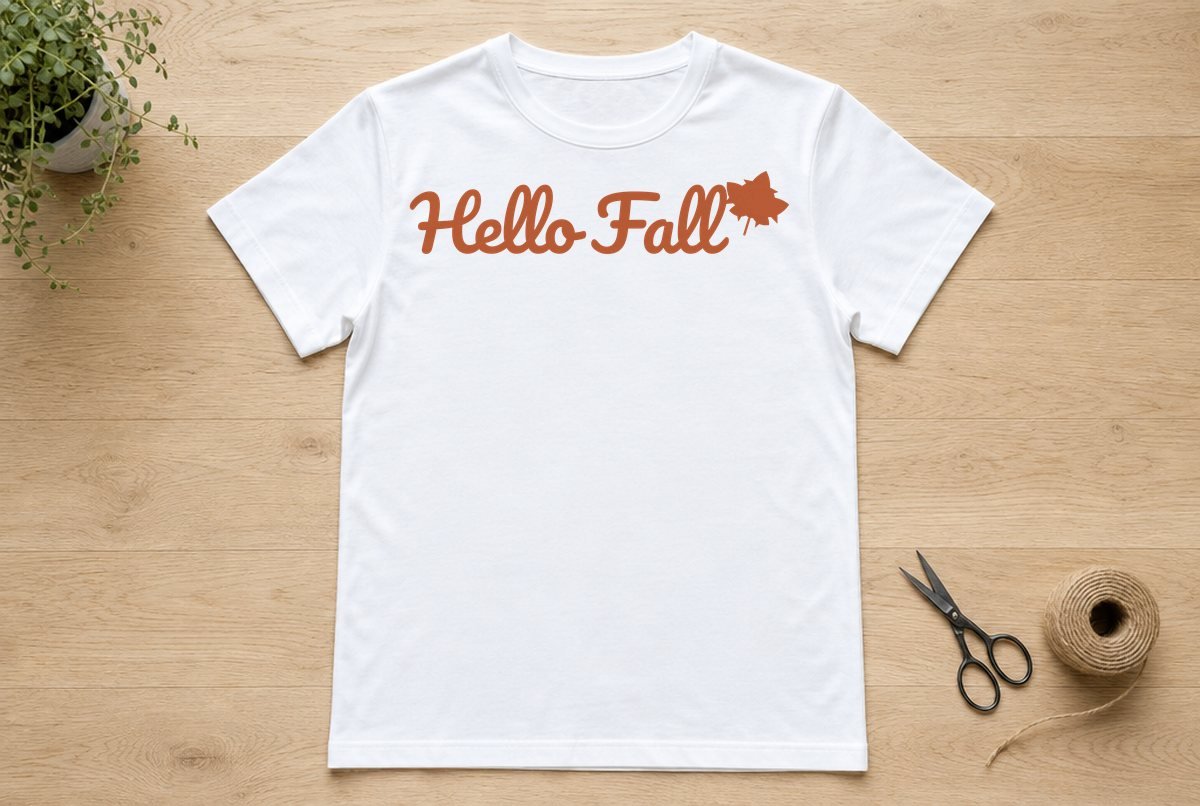
This is a rounded, bouncy “Hello Fall” in connected script, finished with a maple leaf that grows off the last letter. It’s the kind of phrase that goes on a cozy sweatshirt in September and stays in rotation until Thanksgiving.
The file opens at 10.1 x 2.3 in and was built for iron-on (HTV), so it’s ready for an adult sweatshirt, tee or tote without resizing. It also cuts well in adhesive vinyl for a wood sign or door hanger.

| File | Size | Material | Layers | Check |
|---|---|---|---|---|
| Hello Fall | 10.12 × 2.38 in | HTV (iron-on) | 1 layer | ✓ Cut-checked |
How the file is built
The letters in each word run together, the way script should, and the overlaps are welded so the blade never cuts through a join. The whole design comes out as three pieces:
- “Hello” as one connected word
- the capital F on its own
- “all” with the maple leaf attached to the final l
Three pieces is easy to handle. Inside those pieces are ten small enclosed counters (the loops of the l’s, the middles of the e, o and a, and a few more). Those are the only fiddly bits to weed.
We checked the file at 10.1 in wide against our iron-on minimums, which call for slightly bolder lines than our adhesive vinyl minimums. It passed: no strokes too thin to cut, no pieces too small to weed, no gaps too narrow to clear.
What you need
- A cutting machine (Cricut, Silhouette or similar)
- Iron-on (HTV) in a fall color: rust, mustard, cream or black all work
- A sweatshirt, tee or canvas tote
- Standard grip mat
- Weeding hook
- Heat press or household iron, plus a firm pressing surface
- Or, for a sign: adhesive vinyl and transfer tape
How to make a Hello Fall shirt
- Upload the SVG. Unzip the download and upload hello-fall.svg. New to that? Follow how to upload an SVG to Cricut Design Space.
- Leave the size alone. It should read 10.1 in wide. The three pieces sit in one layer, so they stay spaced correctly on the mat without any extra Attach step.
- Mirror and cut. Click Make and select your iron-on material. Design Space switches Mirror on automatically for iron-on materials; make sure the toggle is on, because an unmirrored script comes out backward on the shirt. Place the HTV shiny side down on the mat.
- Weed. Pull the background away, then pick out the ten counters. The loops in the double l of “Fall” sit close together, so lift each one on its own rather than dragging across both. How to weed vinyl covers tools and tricks.
- Press. Center the design (on an adult tee, the top usually sits a few inches below the collar), then press using the time, temperature and peel instructions from the Cricut Heat Guide or your HTV maker. Some iron-on is peeled warm and some cool, so check which yours is. Walking through your first one? How to make your first shirt with a Cricut goes step by step.
Sizing
For iron-on, 10.1 in wide is the minimum we checked. Shrinking it for a toddler tee or a mug would make the counters and thin script joins too fine for HTV. In adhesive vinyl, which allows finer detail, the same proportions hold up to about 9 in wide.
| Project | Width | Material |
|---|---|---|
| Adult tee or sweatshirt | 10.1 to 11 in | Iron-on |
| Canvas tote | 10.1 in | Iron-on |
| 18 in pillow cover | 11 to 13 in | Iron-on |
| Wood sign or door hanger | 9 to 11 in | Adhesive vinyl |
| Long porch plank (horizontal) | 14 in and up | Outdoor-rated permanent vinyl |
A 12 x 12 in mat holds a design up to a bit under 12 in wide. Past that, use a 12 x 24 in mat. Looking for something to go on a vertical board instead? The Happy Fall Y’all porch sign SVG is laid out tall.
Where to put it
On an adult sweatshirt, a 10.1 in wide phrase fills most of the chest without wrapping into the side seams. Fold the shirt in half lengthwise and press lightly to make a center crease, then line the middle of the design (between the o of “Hello” and the F) up with that crease. On a tote, center it on the flat panel and keep it clear of the handle seams, which can make the press uneven.
Making a sign instead? Cut it from adhesive vinyl with Mirror off, weed, then use transfer tape to lift all three pieces at once so their spacing stays exactly as designed.
Variations
Cut the phrase in cream HTV on a rust or olive sweatshirt for a softer look than black on white. Or keep the letters one color and press a second-color leaf on top: cut the design twice, trim everything except the leaf from the second cut, and layer it (see how to layer HTV).
Script is where forgotten mirroring hurts most, since you can’t flip a pressed design. Check the mat preview before you press Go: the words should read backward on screen.
Questions
Can I make the Hello Fall SVG smaller for a kids’ shirt?
We don’t recommend it in iron-on. The file was checked at 10.1 in wide for HTV; smaller than that, the letter loops and joins can get too thin to cut and weed cleanly.
Is the Hello Fall script one piece?
It cuts as three pieces: “Hello”, the capital F, and “all” joined to the maple leaf. They’re in one layer, so they keep their spacing on the mat.
Do I need to mirror this design?
Only for iron-on. Design Space turns Mirror on automatically when you pick an iron-on material. For adhesive vinyl on a sign, leave it unmirrored.