Vinyl Cutters and Heat Presses in the Makerspace: Models, Manuals and Settings
A neutral reference for library, school and community makerspaces that lend or run vinyl cutters and heat presses: which machines take which files, the makers’ own cut and heat settings for common heat-transfer vinyls, official manuals that still work, and two printable station cards.
- No ads, no sign-up. No account, no email, nothing to buy.
- Every spec from the maker’s own page or manual, October 6, 2026
- Silhouette, Brother, Siser, Roland, GCC and Cricut

Why this exists. Makerspace equipment guides link to product pages, tutorials and manuals, and the makers move them often: Silhouette Canada’s Cameo 4 page, Siser’s old siserna.com tutorials, a GCC product page and several Cricut product URLs all return “page not found” today. This page collects the current official links in one place and is re-checked every quarter. For Cricut materials settings in depth, see our Cricut makerspace guide.
Which machine do you have?
Status and specs are from each maker’s current product page, support article or manual. “Older” means the maker no longer lists it for sale but still posts its manual and supports it in its software.
| Machine | Status | Cut width | Needs a mat? | Software and files | Official links |
|---|---|---|---|---|---|
| Silhouette | |||||
| CAMEO 5α | Sold now | 12 in (5α Plus: about 15 in) | Not for lined vinyl and HTV; yes for unlined media | Silhouette Studio: Basic is free (DXF, traced PNG/JPG). SVG and PDF need Designer Edition or higher. | manual (PDF) · support · product page |
| CAMEO 5 / 5 Plus | Older; still supported | 12 in (Plus: 15 in) | Not for lined vinyl and HTV | Silhouette Studio: Basic is free (DXF, traced PNG/JPG). SVG and PDF need Designer Edition or higher. | manual (PDF) · support |
| Cameo 4 (also 4 Plus 15 in, 4 Pro 24 in) | Cameo 4 Plus and Pro sold now | 12 in | Not for lined vinyl and HTV | Silhouette Studio: Basic is free (DXF, traced PNG/JPG). SVG and PDF need Designer Edition or higher. | manual (PDF) · support |
| Cameo 3 | No longer made; still supported | not published today | Mat for unlined media | Silhouette Studio: Basic is free (DXF, traced PNG/JPG). SVG and PDF need Designer Edition or higher. | manual (PDF) · support |
| Portrait 4 | Sold now | 8.5 in | Not for lined materials | Silhouette Studio: Basic is free (DXF, traced PNG/JPG). SVG and PDF need Designer Edition or higher. | manual (PDF) · support · product page |
| Portrait 3 | Older; manual online | not published today | With or without a mat | Silhouette Studio: Basic is free (DXF, traced PNG/JPG). SVG and PDF need Designer Edition or higher. | manual (PDF) · support |
| Curio 2 (flatbed) | Sold now | 12 × 12 in bed | Always a protector sheet or mat on the tray | Silhouette Studio: Basic is free (DXF, traced PNG/JPG). SVG and PDF need Designer Edition or higher. | manual (PDF) · support · product page |
| Brother | |||||
| ScanNCut DX SDX125E | Sold now | 11.65 in on a 12 × 12 mat | Yes (roll feeder optional) | CanvasWorkspace (free) opens SVG and DXF; the machine also scans drawings. | manual (PDF) · support · product page |
| ScanNCut DX SDX225 | Through dealers | 11.65 in | Yes (roll feeder optional) | CanvasWorkspace (free) opens SVG and DXF. | manual (PDF) · support · product page |
| Siser | |||||
| Romeo (24 in class) | Sold now | material up to 25 in wide | Optional | Leonardo Design Studio Basic (free) imports SVG, PNG, JPG, TIF. | support · product page |
| Juliet (12 in) | Discontinued; Leonardo still supports it | 12 in | Optional | Leonardo Design Studio Basic (free) imports SVG. | support · product page |
| Roland DG | |||||
| VersaSTUDIO GS2-24 (CAMM-1) | Sold now | 22.9 in | No (roll or sheet fed) | CutStudio (free, bundled) imports AI/EPS, JPG, PNG, BMP. Illustrator and CorelDRAW plug-ins send cuts directly. | manual (PDF) · support · product page |
| GCC | |||||
| Expert II 24 / 24 LX | Sold now | 23.6 in | No (roll fed) | GreatCut-S (free with the cutter) imports SVG and PDF, and also works as a CorelDRAW/Illustrator plug-in. | support · product page |
| Cricut | |||||
| Explore Air 2 | Refurbished only | 11.5 in on a 12 × 12 mat | Yes | Design Space (free) opens SVG, DXF (not on phones/tablets), PNG, JPG. | support · product page |
| Explore 3 (now Explore 5) | Refurbished only | 11.7 in | Not for Cricut Smart Materials | Design Space (free). | support · product page |
| Maker 3 (now Maker 4 and 5) | Refurbished only | 12 in on a mat | Not for Smart Materials | Design Space (free). | support · product page |
| Joy (now Joy 2) and Joy Xtra | Joy refurbished; Joy 2, Joy Xtra sold now | 4.5 in (Joy Xtra 8.5 in) | Not for Smart Materials | Design Space (free). Bluetooth only, no USB. | manual (PDF) · support · product page |
| Venture | Sold now | 24 in | Not for Smart Materials | Design Space desktop only. | manual (PDF) · support · product page |
Silhouette’s own pages give different maximum cut lengths for some models, so we’ve left length out; check the manual for your model. Cut widths for Cameo 3 and Portrait 3 aren’t on Silhouette’s current pages.
Which file should you use?
SVG (free). DXF works on computers, not on the phone and tablet apps. PDF isn’t supported, and SVGs are limited to 5,000 paths (Cricut).
Basic (free): DXF, or trace a PNG. Designer Edition and up: SVG and PDF. Saving as SVG needs Business Edition (Silhouette).
SVG and DXF, free on Windows and Mac (Brother).
Basic (free) imports SVG, PNG, JPG and TIF (Siser).
Imports AI/EPS, JPG, PNG and BMP; SVG isn’t listed. Use the Illustrator or CorelDRAW plug-in to cut an SVG (Roland).
Free with GCC cutters; imports SVG and PDF, and works as a plug-in for CorelDRAW (Windows) and Illustrator (GCC).
Every free file on Clean Cut SVG comes as SVG, DXF and PNG, so it opens in all of these. Roland VersaWorks print-and-cut jobs use a spot color named CutContour on the path to cut (PerfCutContour for a perforated cut), explained in Roland’s VersaWorks 6 help.
Cut settings for heat-transfer vinyl
Siser, a large HTV maker, publishes starting settings for its vinyls on seven cutters. These are copied from its cutter settings chart (September 2026 edition). Siser calls them “suggested starting points” that may need adjusting for blade, cutting strip and mat wear. Always cut a test square first.
| Material | Siser Romeo / Juliet | Cricut Explore Air | Cricut Maker | Silhouette 4 & 5 | Brother ScanNCut DX | Roland GX/GS-24 | Graphtec |
|---|---|---|---|---|---|---|---|
| Siser EasyWeed | 45° blade · force 5-10 · speed 10 | Vinyl+ / Everyday Iron-On | Vinyl+ / Everyday Iron-On | AutoBlade 3 · Heat Transfer Smooth · force 6 · speed 8 | Auto blade · speed 5 · half cut Auto | 45° blade · 80-90 gf · 30-50 cm/s | 45° blade · 8-9 gf · CB09U+0 · 30 cm/s |
| Siser Glitter | 45° blade · force 30-35 · speed 10 | Glitter Iron-On | Glitter Iron-On | AutoBlade 4 · Heat Transfer Glitter · force 11 · speed 8 | Blade 3 · speed 5 · half cut 5 | 45° blade · 180-190 gf · 30-50 cm/s | 45° blade · 17-18 gf · CB09U+0 · 30 cm/s |
| Siser Brick 600 | 45° blade · force 25-37 · speed 10 | Light Cardstock+ | Cardstock | AutoBlade 7 · Heat Transfer Smooth · force 20 · speed 8 | Auto blade 7 · speed 1 · cut pressure 2 | 60° blade (not 45°) · 150-190 gf · 30-50 cm/s | 60° blade · 8-9 gf · CB09U+0 · 25 cm/s |
Siser notes that on the Roland GX/GS-24, Brick 600 needs the blade extended further and a 60° blade, not 45°. Cricut “settings” are the material names to pick in Design Space.
Heat press settings for common HTV
Use the chart from the vinyl’s maker, not a generic one: the same temperature can be right for one brand and wrong for another. All iron-on is cut mirrored. Siser’s numbers are for a heat press; Siser says EasyPress users add about 30°.
| Material | Temperature | Time | Pressure | Peel | Source |
|---|---|---|---|---|---|
| Siser EasyWeed | 305°F / 150°C | 10-15 s | Medium | Hot or cold | Siser chart (heat press) |
| Siser EasyWeed Electric | 305°F / 150°C | 10-15 s | Medium | Hot or cold | Siser chart (heat press) |
| Siser EasyWeed EcoStretch | 250°F / 120°C | 10-15 s | Medium | Hot | Siser chart (heat press) |
| Siser Glitter | 320°F / 160°C | 10-15 s | Medium | Warm | Siser chart (heat press) |
| Siser Brick 600 | 310°F / 155°C | 15-20 s | Medium | Cold | Siser chart (heat press) |
| Cricut Everyday Iron-On | 315°F / 155°C | 30 s | Firm | Cool | Cricut Heat Guide, EasyPress SE / 2 |
| Cricut Glitter Iron-On | 330°F / 165°C | 30 s | Firm | Cool | Cricut Heat Guide, EasyPress SE / 2 |
| Cricut SportFlex Iron-On | 305°F / 150°C | 30 s | Firm | Cool | Cricut Heat Guide, EasyPress SE / 2 |
| STAHLS' CAD-CUT Premium Plus | 280-300°F / 138-149°C | 8-12 s | Medium | High Tack hot; Low Tack warm | STAHLS' HTV reference guide |
| STAHLS' UltraWeed | 260-300°F (280-300°F on 50%+ cotton) | 12 s | Medium | Hot | STAHLS' HTV reference guide |
| Cricut Infusible Ink Transfer Sheet | 385°F / 195°C | 40 s | Firm | Remove liner warm | Cricut Heat Guide, EasyPress SE / 2, compatible T-shirt |
Cricut’s Heat Guide gives settings by material, base fabric and press; EasyPress 3 and Hat Press settings are in the Cricut Heat app. Siser’s full application chart covers its other vinyls. Values read October 6, 2026.
Heat presses you’ll see in makerspaces
| Press | Type | Temperature | Plate | Auto-off | Official links |
|---|---|---|---|---|---|
| Cricut EasyPress SE | Handheld | Up to 400°F | 9 × 9 or 12 × 10 in | After 13 min idle | manual (PDF) · product page |
| Cricut EasyPress 2 | Handheld (no longer sold new) | Up to 400°F | 6 × 7, 9 × 9, 12 × 10 in | After 10 min | manual (PDF) |
| Cricut EasyPress 3 | Handheld, app control (refurbished only) | Up to 400°F | 9 × 9, 12 × 10 in | After 13 min idle | manual (PDF) · product page |
| Cricut EasyPress Mini | Small handheld | 3 settings, 255-400°F | Small precision plate | After 13 min | product page |
| Cricut Autopress | Automatic clamshell | 170-400°F | 15 × 12 in | After 13 min idle | manual (PDF) · product page |
| Cricut Mug Press | Mug (Infusible Ink) | Automatic | 11-16 oz straight-wall mugs | Yes | product page |
| Cricut Hat Press | Hat (curved plate) | 3 settings, 255-400°F | Designs up to 2.25 × 4.25 in per press | After 13 min idle | manual (PDF) · product page |
| Silhouette CloChé | Compact clamshell | 248-392°F, 3 settings | 9.8 × 5.9 in guaranteed | Not stated | manual (PDF) · product page |
| Hotronix (STAHLS') MAXX 250 Clam | Manual clamshell | 205-430°F | 11 × 15, 15 × 15, 16 × 20 in | Not stated | manual (PDF) · product page |
| HTVRONT Auto Heat Press 15 × 15 | Automatic, pull-out drawer | Up to 410°F | 15 × 15 in | After 15 min | product page |
From each maker’s product page or manual, October 6, 2026. “Not stated” means we didn’t find it in the sources we read. Mug Press settings are automatic; it’s for sublimation-type (Infusible Ink) mugs.
Safety
- Age limits. Cricut’s manuals say the EasyPress SE and the Autopress are “not intended for use by children 12 years of age and under”. The Mug Press product page says “Adult use only”. Silhouette’s CloChé safety manual says not to let children use the machine alone.
- Heat and fumes. Heat presses are hot surfaces that can cause burns. Cricut says to use its presses in a well-ventilated area and never leave them unattended; Infusible Ink gives off vapors that “may be irritating to sensitive individuals”.
- Blades. Cutter blades and weeding hooks are sharp. Keep spare blades in their holders and the hooks in a cup, points down.
Sources: Cricut Autopress safety, EasyPress SE user guide, Cricut Mug Press, Silhouette CloChé safety manual, Cricut Infusible Ink safety.
Free cutter test files
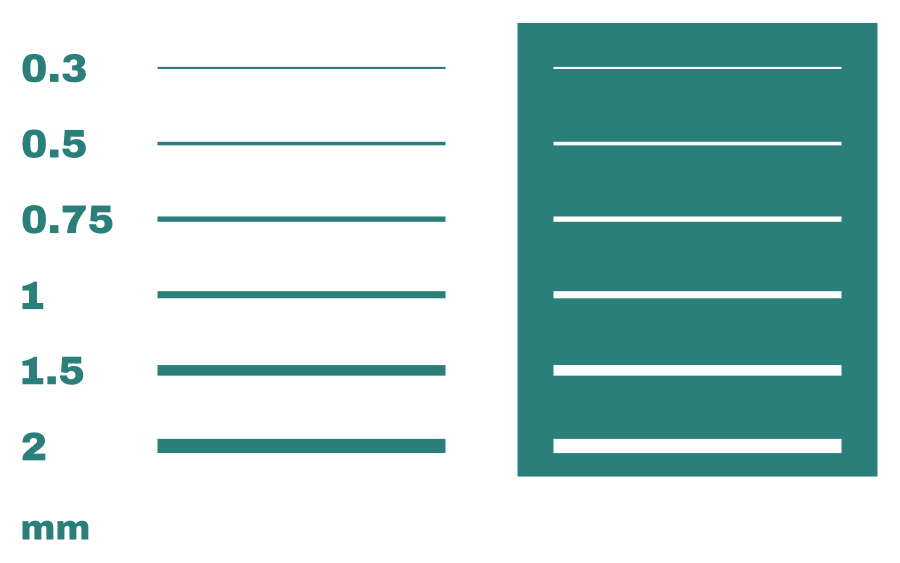
Three test files for any cutter: a 1 in test square with a star (cut it first on every new material; it should measure exactly 1 in), a line-and-gap ladder from 0.3 to 2 mm, and a dot ladder from 0.5 to 3 mm.
⬇ Download the test files (ZIP)
SVG, DXF and PNG. The two ladders deliberately go thinner than our own software check allows (about 0.9 mm in vinyl), so you can see where your blade, vinyl and weeding hand stop. Free to cut, copy and share. Single files: test square SVG · DXF

Printable station cards
Two letter-size cards to laminate and keep next to the equipment. The heat press card has the makers’ settings for common HTV and blank rows for what your space stocks; the cutter card has a test-cut checklist and a log for settings that worked.
Heat press station
Every time
- Cut iron-on (HTV) with Mirror ON, shiny side down on the mat
- Pre-press the shirt for a few seconds to remove moisture and wrinkles
- Shiny carrier sheet faces up on the shirt
- Use the temperature, time and pressure for your material, from its maker
- Peel hot, warm or cold as the chart says
Safety
- Hot surface: never leave the press on and unattended
- Use in a well-ventilated room
- Cricut says its EasyPress SE and Autopress aren’t for children 12 and under; Mug Press is adults only
- Turn off and unplug when you finish
Settings we use here (from each maker’s chart)
| Material | Temp | Time | Pressure | Peel |
|---|---|---|---|---|
| Siser EasyWeed | 305°F | 10-15 s | Medium | Hot or cold |
| Siser EasyWeed Electric | 305°F | 10-15 s | Medium | Hot or cold |
| Siser EasyWeed EcoStretch | 250°F | 10-15 s | Medium | Hot |
| Siser Glitter | 320°F | 10-15 s | Medium | Warm |
| Siser Brick 600 | 310°F | 15-20 s | Medium | Cold |
| Cricut Everyday Iron-On | 315°F | 30 s | Firm | Cool |
| Cricut Glitter Iron-On | 330°F | 30 s | Firm | Cool |
| Cricut SportFlex Iron-On | 305°F | 30 s | Firm | Cool |
Siser values are for heat presses; Siser says EasyPress users add about 30°. Cricut values are from the Cricut Heat Guide for EasyPress SE/2. Check the maker’s current chart before a new material. From cleancutsvg.com/vinyl-cutter-heat-press-guide. Not affiliated with any brand named.
Vinyl cutter station
Before you cut
- Open the file: SVG (or DXF for Silhouette Studio Basic)
- Check the size: measure the design, not the screen
- Iron-on (HTV)? Turn Mirror ON, shiny side down
- Pick the material setting below, or the maker’s chart
- Cut the 1 in test square first
Test cut says
- Didn’t cut through: more force/pressure, or a fresh blade
- Cut the backing: less force, or less blade showing
- Corners tearing: slow the speed
- Wrong size: check the import units
Settings that worked on this machine
| Material | Blade | Setting / force | Speed | Notes |
|---|---|---|---|---|
Free test files and each maker’s settings: cleancutsvg.com/vinyl-cutter-heat-press-guide. Not affiliated with any brand named.
Links that moved
If your makerspace page links to any of these, here is where to point it now.
| Old link | What happened (checked October 6, 2026) | Link this instead |
|---|---|---|
silhouettecanada.ca/pages/cameo-4 | Page not found | Silhouette Canada Cameo machines |
silhouettecanada.ca/pages/portrait-2 | Page not found | Silhouette Canada Portrait 4 |
silhouetteamerica.freshdesk.com/…/35000227669 (Curio overview) | Page not found | Curio 2 manual and use information |
silhouetteonlinestore.com | Page not found | Silhouette Design Store |
siserna.com/intro-to-leonardo-design-studio | Siser moved to siserstore.com; the tutorial is gone | Leonardo Design Studio page |
siserna.com/heat-transfer-vinyl/easyweed | Page not found | Siser EasyWeed page |
downloadcenter.rolanddg.com/…/VW6_English/bto1665032197584.htm (cut line types) | Page not found | VersaWorks 6: Creating the Cutting Data |
gccworld.com/goods.php?act=view&no=20 | Page not found (old Expert 24 LX page) | GCC Expert II |
cricut.com/…/cricut-explore-air-2-blue/2006519.html | Page not found | Explore Air 2 page (refurbished) |
cricut.com/…/easypress-machines/ (EasyPress 2 12 × 10) | EasyPress 2 is no longer sold new | EasyPress SE 12 × 10 |
cricut.com/en_us/…/perforation-blade-basic.html | Page not found | Cricut: all about blades and tools |
shop.cricut.com/en_us/essential-tool-set-mint.html | Page not found | Essential Tool Set |
community.cricut.com | The forum address no longer loads | Cricut Community inside Design Space |
Library copies of Cricut Mug Press instructions (PDF) | Many have moved or expired | Cricut: How to use Mug Press |
heatpressguide.com articles | 410: removed by the site | Cricut Heat Guide; Siser chart below |
stahlstv.com/41-things-you-can-make-with-your-vinyl-cutter | Redirects to stahls.com; the article is gone | STAHLS' home (no replacement found) |
icraftvinyl.com HTV heat settings posts | Page not found (site renamed) | Siser HTV application chart (PDF) |
Common questions
Can a Silhouette Cameo open SVG files?
Yes, in Silhouette Studio Designer Edition or higher. The free Basic Edition opens DXF files and traces PNG or JPG images, which is why our files come in DXF too.
What heat press temperature should I use for HTV?
Use the chart from the vinyl's maker. Siser lists EasyWeed at 305°F for 10-15 seconds with medium pressure on a heat press, and says EasyPress users should add about 30°. Cricut's Heat Guide gives settings for Cricut materials by press and fabric.
Do I need to mirror iron-on vinyl?
Yes. Iron-on is cut from the back, shiny carrier side down, so turn on Mirror before cutting or your words come out backward.
Can kids use a heat press in a library makerspace?
Check your press's manual. Cricut says its EasyPress SE and Autopress are not intended for children 12 and under and that the Mug Press is for adults only. Silhouette says not to let children use the CloChé alone.
Cite or link this page
No ads, no sign-up, nothing to buy. You’re welcome to link this page from a makerspace guide, an equipment record or a staff handbook, and to print the station cards.
APA: Clean Cut SVG. (2026, October 6). Vinyl cutters and heat presses in the makerspace: Models, manuals and settings. https://cleancutsvg.com/vinyl-cutter-heat-press-guide/
MLA: “Vinyl Cutters and Heat Presses in the Makerspace: Models, Manuals and Settings.” Clean Cut SVG, 6 Oct. 2026, cleancutsvg.com/vinyl-cutter-heat-press-guide/.
Checked October 6, 2026; re-checked quarterly. Spot a changed spec or a dead link? Email hello@cleancutsvg.com. Clean Cut SVG is independent and not affiliated with Silhouette, Brother, Siser, Roland DG, GCC, Cricut, STAHLS’ or HTVRONT; their names are trademarks of their owners. The image at the top is an illustration.
More for makerspace staff
The Cricut makerspace guide has a full materials and settings chart for Cricut machines; the library makerspace pack has beginner files and a kit card; your first iron-on shirt walks through a first HTV project.