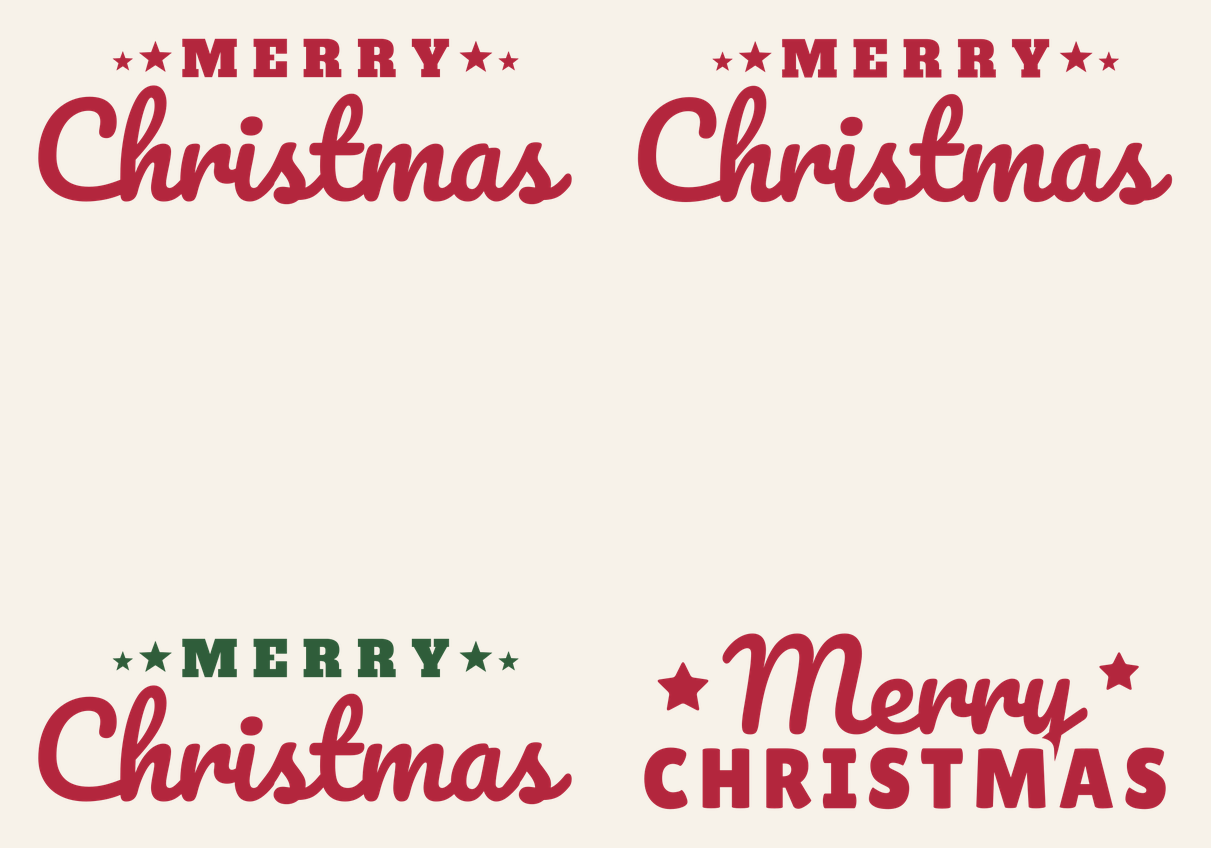
Big brush-script “Christmas,” a line of spaced-out slab capitals reading MERRY above it, and a pair of stars on each side. It’s a classic layout, and it fills a wide space well: the front of a throw pillow, a long wood sign, a tote bag.
You get four files. Two are the same one-color design at different sizes: a 10 in version for iron-on (pillows, totes, shirts) and an 11.25 in version for adhesive vinyl on a sign. The third splits that design into two colors. The fourth is a compact 3.5 in lockup redrawn for mugs, because the full design gets too fine at that size.
| File | Size | Material | Layers | Check |
|---|---|---|---|---|
| Merry Christmas (pillow, 10 in) | 10.12 × 3.25 in | HTV (iron-on) | 1 layer | ✓ Cut-checked |
| Merry Christmas (sign, 11.25 in) | 11.38 × 3.62 in | Vinyl | 1 layer | ✓ Cut-checked |
| Merry Christmas two-color (10 in) | 10.12 × 3.25 in | HTV (iron-on) | 2 layers | ✓ Cut-checked |
| Merry Christmas (mug, 3.5 in) | 3.62 × 1.38 in | Vinyl | 1 layer | ✓ Cut-checked |
Pick the right file
| File | Size | Built for | Good on |
|---|---|---|---|
| Pillow | 10 x 3.1 in | Iron-on (HTV) | 16 to 20 in pillow covers, totes, adult shirts |
| Sign | 11.25 x 3.5 in | Adhesive vinyl | Wood boards, canvas panels, glass doors |
| Two-color | 10 x 3.1 in | Iron-on (HTV) | Pillows and totes in red and green |
| Mug | 3.5 x 1.25 in | Permanent adhesive vinyl | Mugs, tumblers, small ornaments |
The pillow and sign files share one design, so you can also use the sign file for iron-on or the pillow file for vinyl. What changes is the check. Iron-on gets a wider minimum stroke than adhesive vinyl in our cut check, and the pillow file passed it at 10 in. Going smaller than 10 in with iron-on isn’t something we tested.
How the lettering is built
“Christmas” is set in Pacifico, a round, heavy script whose letters join with narrower connecting strokes. We welded the letters into one continuous piece, so there are no overlapping letter edges for the blade to cut twice. MERRY is Alfa Slab One, spaced wide, with a larger and a smaller five-point star at each end.
In the one-color files, all of that is a single cut layer: the script, the five capitals and four stars. The two-color file splits it into a red “Script” layer (just “Christmas”) and a green “Serif + stars” layer (MERRY and the stars). The two layers don’t overlap anywhere, so there’s no stacking; you press or stick them side by side.
The mug file is a different arrangement. “Merry” becomes the script, “CHRISTMAS” drops to heavy rounded capitals in Lilita One, and two rounded stars sit at the upper corners. Where the tail of the y comes down toward the capitals, we cut a small gap so the two words don’t fuse into one blob at 3.5 in.
What you need
- Cutting machine and a standard grip mat
- Iron-on (HTV) for pillows and totes, or permanent adhesive vinyl for signs and mugs
- Transfer tape (adhesive vinyl only)
- Heat press or household iron, and a pressing cloth or protective sheet
- Weeding hook
- Pillow cover, tote, sign blank or mug
Making the pillow
A zippered or envelope pillow cover is easier than a sewn-shut pillow, because you can press it flat with the insert out.
- Upload the pillow file. Follow the steps in our upload guide and check that it reads 10 in wide.
- Make it and mirror. Click Make It. On the Prepare screen, turn Mirror on for the mat. Design Space usually does this for you once you pick an iron-on material, but check the toggle anyway.
- Cut shiny side down. Iron-on goes on the mat with the shiny carrier sheet facing down.
- Weed. Pull the background away, then pick out the inside of the a and the two R’s. The i dot and the stars are separate small pieces, so leave them on the carrier.
- Press. Center the design on the cover and press with the time, temperature and pressure for your iron-on and fabric from Cricut’s Heat Guide or the maker’s instructions. Peel the carrier warm or cold, as that material calls for.
New to iron-on? Making your first shirt covers the same mirror, weed and press routine in more detail.
For the two-color version, cut each color on its own mat, both mirrored. Press the green layer first just long enough to tack it down, peel its carrier, then place the red “Christmas” and give the whole design its full press. Check your iron-on’s instructions for multi-layer pressing, since some brands differ.
On a sign or a mug
For adhesive vinyl, leave Mirror off and cut with the colored side up. After weeding, lift the design with transfer tape, position it and burnish it down. Our transfer tape guide covers the hinge method, which makes it much easier to center a long design on a board.
On a mug, use permanent vinyl and the mug file at 3.5 in. Most mugs have room for a design about 3 to 3.5 in tall, so this one leaves plenty of space. Curves make vinyl wrinkle, so read our guide to vinyl on a mug before you apply it.
Sizes
| Project | File | Width |
|---|---|---|
| Mug or tumbler | Mug | 3.5 in |
| Adult shirt or tote bag | Pillow | 10 to 11 in |
| 16 to 20 in pillow cover | Pillow or two-color | 10 to 12 in |
| Wood sign, 12 x 24 in board | Sign | 11.25 to 20 in |
The full design wasn’t made to go under 10 in. At smaller sizes the thin joins in the script and the points on the small stars get too narrow, which is why the mug gets its own layout. Scaling up is fine.
A couple of variations
Try white glitter iron-on on a red or plaid pillow cover, or the two-color file in gold and cream on a dark green one. On a wood sign, the sign file works as a stencil if you’d rather paint: cut it from stencil vinyl, weed out the letters and paint inside them. Hold on to the counters of the R’s and a so they don’t get painted over. Building a set of holiday signs? North Pole and Let It Snow are two more sign designs to pair with it.
Questions
What size should Merry Christmas be on a pillow?
For a 16 to 20 in pillow cover, 10 to 12 in wide looks balanced. The pillow file opens at 10 in.
Can I use the Merry Christmas SVG on a mug?
Use the mug file. It’s a compact 3.5 in layout with heavier capitals, designed for permanent vinyl on a mug, because the full design gets too fine at that size.
What fonts are in this design?
Pacifico for the script, Alfa Slab One for MERRY, and Lilita One for CHRISTMAS in the mug version. All three are free Google Fonts, and the files are already converted to cut paths, so you don’t need them installed.