Vinyl Decal Size Calculator: Letter Height, Fit and Vinyl Needed
Type your words, pick a font and a letter height, and see the finished decal size before you cut. The calculator checks it against your machine’s real cut area, works out how many copies fit on a mat, and tells you how much vinyl to buy.
- No ads, no sign-up. Nothing to buy on this page.
- 44 free fonts measured from their outlines
- Cut areas from Cricut and Silhouette
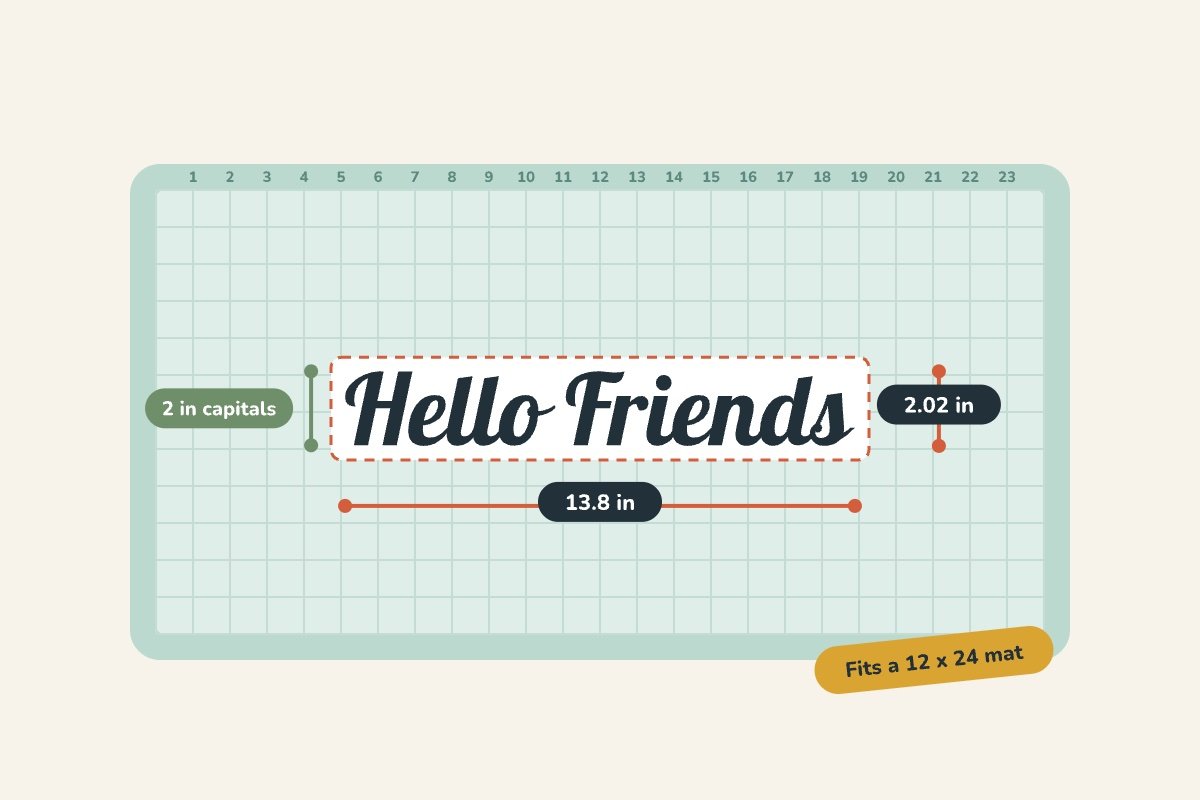
How the calculator works
Lettering. Every font in the list is a free, open-license font from our free fonts license guide. We read each letter’s width and height from the font file itself, scaled so a capital letter is exactly the height you type. The finished width runs from the left edge of the first letter to the right edge of the last one, and the height includes any loops or tails that dip below the line.
Shapes and images. Type the size of the design as it will be cut. Leave “Keep proportions” on and change one side, and the other side follows, the same way it does in your design software.
Fit and copies. The calculator compares the design with the cut area the maker publishes for your mat, tries it both ways round, and lays out as many copies as fit with the spacing you choose. On a roll, it fills the cut width first and then works out the length.
Smallest letter size. For each font we show the smallest cap height that passed our own software check for strokes too thin to cut and gaps too narrow to weed. It’s a software check, not a test cut on every machine, so cut a test before a big project.
Cut areas by machine
These are the makers’ own published figures, read from their pages in October 2026. The cut area is always a little smaller than the mat.
| Machine | On a mat | Without a mat | Source |
|---|---|---|---|
| Cricut Maker 5 | 12 x 12 in mat: 11.5 × 11.5 in 12 x 24 in mat: 11.5 × 23.5 in | Smart Materials (no mat): 12 in wide, single cut up to 12 ft | Cricut Help Center |
| Cricut Maker 3 | 12 x 12 in mat: 11.5 × 11.5 in 12 x 24 in mat: 11.5 × 23.5 in | Smart Vinyl (no mat): 11.7 in wide, single cut up to 12 ft | Cricut Help Center |
| Cricut Explore 3 | 12 x 12 in mat: 11.5 × 11.5 in | Smart Vinyl (no mat): 11.7 in wide, single cut up to 12 ft | Cricut Help Center, Design Space mat sizes |
| Cricut Explore Air 2 | 12 x 12 in mat: 11.5 × 11.5 in 12 x 24 in mat: 11.5 × 23.5 in | Mat only | Cricut Help Center |
| Cricut Joy | Small mat: 4.25 × 6.25 in Long mat: 4.25 × 11.75 in | Smart Materials (no mat): 4.5 in wide, single cut up to 4 ft | Cricut Help Center |
| Cricut Joy 2 | Small mat: 4.2 × 6.2 in Large mat: 4.2 × 11.7 in | Smart Materials (no mat): 4.5 in wide, single cut up to 4 ft | Cricut product page |
| Cricut Joy Xtra | 8.5 x 12 in mat: 8.25 × 11.75 in | Smart Materials (no mat): 8.5 in wide, single cut up to 4 ft | Cricut Help Center |
| Silhouette CAMEO 5α | 12 x 24 in cutting mat: 12 × 24 in | Lined material (no mat): 11.6 in wide, single cut up to 16 ft | Silhouette America |
| Silhouette Cameo 4 Plus (15 in) | Cutting mat: 14.6 × 15 in | Lined media (no mat): 14.6 in wide, single cut up to 10 ft | Silhouette America |
| Silhouette Portrait 4 | Cutting mat: 8.5 × 12 in | Lined material with a Roll Feeder: 8.6 in wide, single cut up to 54 in | Silhouette America |
Silhouette’s Portrait 4 page lists 8.6 in x 4.5 ft with a Roll Feeder in its specifications and “cut up to 16 feet” elsewhere on the same page; we use the specification line. For machines not listed, check the manual and choose “Other machine.”
Before you cut
Measure the surface, not the file
Measure the flat part of the mug, sign, window or shirt where the decal will sit, then take a little off each side so the decal doesn’t wrap onto a curve or a frame.
Weld script lettering
Connected scripts cut as one piece only when the letters are welded. Unwelded, every overlap becomes a cut line through the vinyl.
Space copies for weeding
A quarter inch between copies gives room to weed and to cut them apart. Go wider if you’ll trim each decal with its own transfer tape.
Cut a test first
Before a big batch, cut one small word in the same font and vinyl. It tells you more than any chart about your blade and your material.
Next steps: how to weed vinyl, how to use transfer tape, permanent vs. removable vinyl and uploading an SVG to Design Space. Running a makerspace? See our vinyl cutter and heat press guide.
Questions
What does “letter height” mean in the calculator?
It's the height of a capital letter such as H, measured from the baseline to the flat top. That's the number most vinyl projects and sign rules talk about. Lowercase letters with tall stems, loops on script fonts, and descenders like g and y can reach above or below it, and the calculator adds those to the finished decal height.
How accurate is the width for lettering?
The calculator measures your words with the actual outlines of 44 free fonts, so the width matches the letters themselves. Kerning and any letter spacing you add in Design Space or Silhouette Studio can change it by a few percent. Check the final size in your software before you cut.
Why is the cut area smaller than my mat?
Cutting machines can't cut right up to the edge of the mat. Cricut, for example, lists the maximum cut area on a 12 x 12 in mat as 11.5 x 11.5 in. The calculator uses each maker's published cut area, not the mat size.
How much vinyl do I need for a long decal?
Choose your machine's matless option (Smart Materials on newer Cricut machines, lined material on Silhouette machines). The calculator lays the copies across the cut width and tells you the length. Buy a bit extra: the software adds some length so the rollers can grip the material.
My machine isn't listed. Can I still use it?
Yes. Choose “Other machine” and type the cut area from your manual or the maker's website. That works for any cutter, including commercial roll-fed vinyl cutters.
Can I put this calculator on my makerspace or class page?
Yes, for free. Copy the embed code on this page and keep the credit line under it. If your site doesn't allow iframes, a link to this page works too.
For educators and librarians
You’re welcome to link to this calculator from a makerspace guide, a library’s Cricut or vinyl-cutter page, or a design and technology class. It’s free, has no ads or sign-up, and collects no data: it runs in the browser.
Clean Cut SVG. (2026). Vinyl decal size calculator. https://cleancutsvg.com/vinyl-decal-size-calculator/
“Vinyl Decal Size Calculator.” Clean Cut SVG, 2026, cleancutsvg.com/vinyl-decal-size-calculator/.
Last updated: October 2026. Machine cut areas are re-checked against the makers’ pages each quarter. Found a mistake? Email hello@cleancutsvg.com.