Christmas dinner place cards don’t have to be fancy to make a table look planned. A folded card with a holiday shape cut through the front and a name written beside it does the job. These tent cards fold along a score line and stand on their own, with a Christmas tree, a star or an ornament cut out of the front panel.
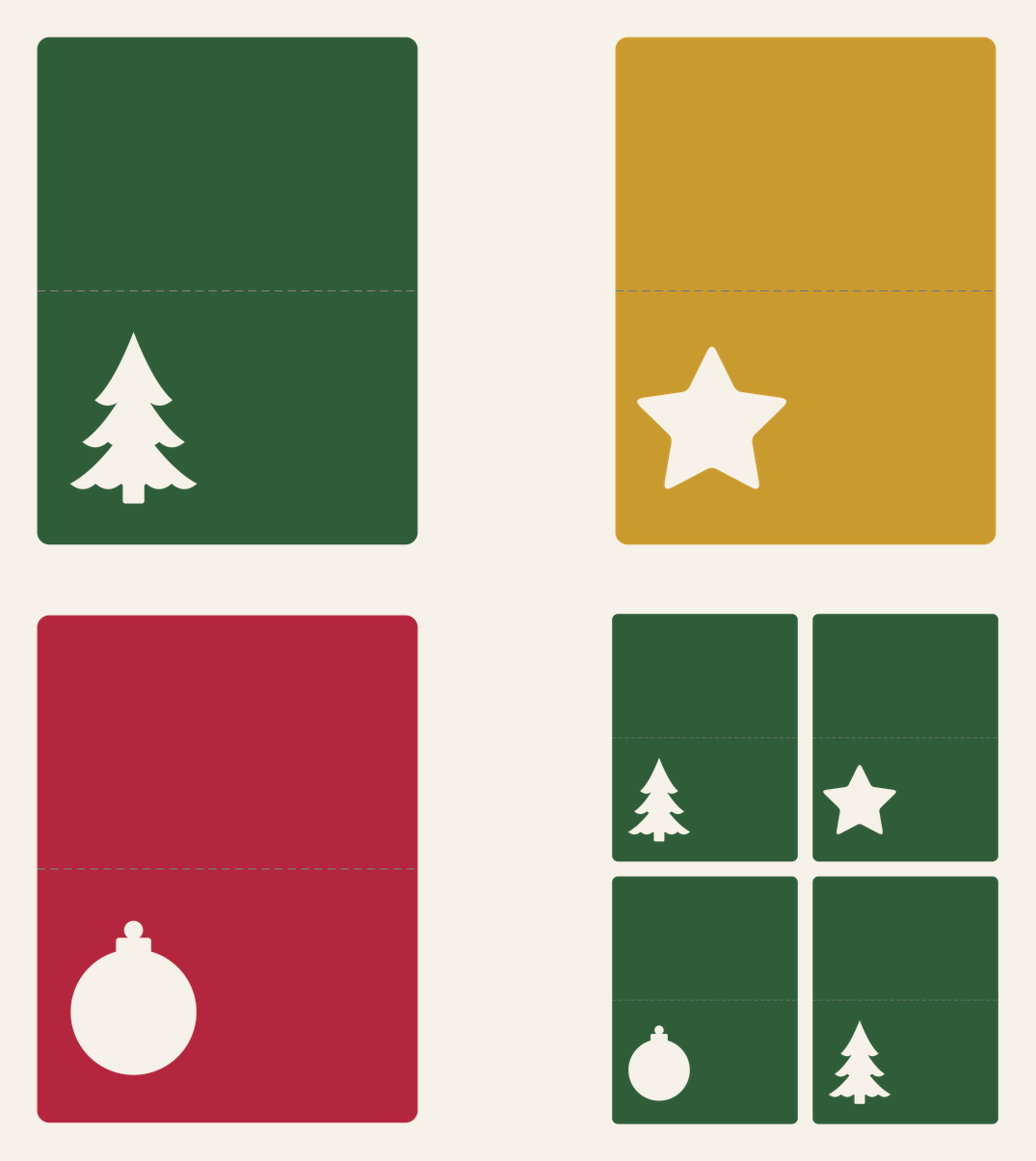
Each card is 3.75 x 5 in flat and folds to 3.75 x 2.5 in. There’s a file for each window shape and a sheet with four cards (two trees, a star and an ornament) that fits letter-size or 12 x 12 cardstock.
| File | Size | Material | Layers | Check |
|---|---|---|---|---|
| Christmas place card, tree window | 3.88 × 5.12 in | Cardstock | 1 layer + score lines | ✓ Cut-checked |
| Christmas place card, star window | 3.88 × 5.12 in | Cardstock | 1 layer + score lines | ✓ Cut-checked |
| Christmas place card, ornament window | 3.88 × 5.12 in | Cardstock | 1 layer + score lines | ✓ Cut-checked |
| Christmas place cards, 4 on a 12x12 mat | 8 × 10.5 in | Cardstock | 1 layer + score lines | ✓ Cut-checked |
How the card is laid out
Each file has two parts. The solid outline is the card, with rounded corners so it won’t dog-ear. The line across the middle is the score line, the fold, set exactly 2.5 in from each short edge so both halves of the tent are the same height and the card stands level.
The window sits on the lower half, toward the left, with about two-thirds of the panel to its right left open for a name. The tree window is a three-tier tree with scalloped hems and a trunk. The star has softly rounded points. The ornament is a round bauble with its cap and a small hanger knob on top, all one opening.
Each window comes out of the card in one piece. That matters on paper: windows with loose islands inside them (the middle of a ring, say) leave little bits that catch on the mat and tear the card on the way off. These don’t have any. All four files passed our cardstock check at full size, including the narrow strip of card between the top of the tree and the fold.
What you need
- Cutting machine and a light or standard grip mat
- Cardstock, 65 lb or heavier (letter-size or 12 x 12)
- A machine scoring tool, or a bone folder and ruler to score by hand
- Fine-tip marker, paint pen or your machine’s pen for names
- Optional: vellum, glitter cardstock or patterned paper to back the window, and a glue pen
Setting up the score line
When you upload the file, the fold line comes in alongside the card, and Design Space treats it as a cut line until you tell it otherwise.
- Upload the file. Use Upload, then Browse, and pick a single card or the four-up sheet. Our upload guide covers the screens in detail.
- Select the fold line on its own. If the card and line came in grouped, ungroup them so you can click just the line in the Layers panel.
- Change its operation to Score. With only the line selected, open the Operation menu and choose Score. Cricut’s help page on selecting an operation shows where it is.
- Attach the line to the card. Select the score line and the card together and click Attach, so the machine scores in that exact spot on that card. Cricut’s Attach instructions explain it. On the four-up sheet, attach the four lines to the sheet together.
- Check the size and cut. A single card reads about 3.88 x 5.12 in including a hair of margin. Pick your cardstock in the Make screen and load the scoring tool when asked.
If the fold is still set to Cut, the machine slices every card in half. Check the mat preview before you press Go: the fold should show as a score line on the same mat as the card.
No scoring tool? Hide or delete the fold line before cutting, then score by hand: lay a ruler across the card at the 2.5 in mark and run a bone folder or an empty ballpoint pen along it with firm pressure.
Folding and finishing
- Clear the window. Turn the mat face down and peel it away from the card. The window shape usually stays on the mat. If it doesn’t, push it out from the back.
- Fold on the score. Fold so the scored dent is on the outside of the tent and the window faces out, then sharpen the fold with a bone folder.
- Back the window (optional). Glue a small square of vellum, gold glitter cardstock or patterned paper inside the front panel, behind the window. From the front the tree or star then reads as a solid color.
- Add the name. Write it to the right of the window. If your machine has a pen, add a text box in a single-line writing font, set its operation to draw, and attach it to the card so the name writes before the card cuts.
Keep the window shapes that drop out. A tree, star or ornament in gold or glitter cardstock makes a tiny gift tag or a scatter piece for the table runner.
Sizes
| File | Flat size | Folded | Fits on |
|---|---|---|---|
| Single card (tree, star or ornament) | 3.75 x 5 in | 3.75 x 2.5 in | Any cardstock scrap 4 x 5.25 in or bigger |
| Four-up sheet | 8 x 10.5 in overall | Four cards | Letter-size (8.5 x 11) or 12 x 12 |
You can scale a card up for a buffet label (say 6 x 8 in flat, for a dish name on the cookie table). Don’t scale it down: the strip of card between the window and the fold gets thinner as the card shrinks and is likely to tear. Resize the card and its attached score line together so the fold stays in the middle.
Color ideas
Classic: green cards with tree windows and red cards with ornament windows, backed in gold. Modern: white or cream cards with each window backed in a different color of vellum, so the shapes glow a little in candlelight. Kraft cards with white names in a paint pen suit a farmhouse table.
For the rest of the table, our personalized ornament template makes a name ornament that doubles as a place setting and a take-home gift. Our Christmas card SVG uses the same window-and-backing idea at card size. For Thanksgiving, the same tent layout comes with leaf windows in our Thanksgiving place cards.
If the fold cracks
Cracking along the fold usually means the card was folded against the score (dent on the inside) or the cardstock is heavy with a dark core. Fold with the dent on the outside, and for thick stock, run a second score by hand along the same line before folding.
Questions
What size are Christmas place cards?
Ours are 3.75 x 5 in flat and fold in half to 3.75 x 2.5 in, which leaves room for a window shape and a first name on the front.
How do I make the fold line score instead of cut in Design Space?
Select only the line, open the Operation menu and choose Score. Then select the line and the card together and click Attach.
How many place cards fit on one sheet of cardstock?
Four. The four-up sheet is 8 x 10.5 in, so it fits letter-size and 12 x 12 cardstock.